Four subjects.
Seven papers. No surprises.
Maths, Stats, Computational Thinking, and Python — prepped on last term’s papers, backed by the notes shelf and the syllabus vault. Timed runs, self-marked, miss by miss.
Archived practice · attempt first, key second
These are May 2026 papers — that term is concluded, so they are practice, not leaks. Each PDF embeds its green-marked answer key. The desk links papers as timed-run artifacts and never extracts or shows answers: attempt on paper first, then self-mark from the key, then revisit the notes that hurt.
BSCS1001
Computational Thinking
Set A · 14 items · 50 marks · 14 pp
section 640653140963 · as printed
Set B · 15 items · 50 marks · 15 pp
section 640653142685 · as printed
BSMA1001
Mathematics for Data Science I
Set A · 14 items · 50 marks · 8 pp
section 640653140967 · as printed
Set B · 13 items · 50 marks · 8 pp
section 640653142687 · as printed
BSCS1002
Programming in Python
Set A · 14 items · 50 marks · 12 pp
section 640653140964 · as printed
BSMA1002
Statistics for Data Science I
Set A · 13 items · 40 marks · 10 pp
section 640653140968 · as printed
Set B · 14 items · 40 marks · 7 pp
section 640653142688 · as printed
The loop
- Pick one set. Sit it like the hall: no notes, no pauses, one sitting.
- Mark yourself against the embedded key — count, don’t rationalize.
- Every miss maps to exactly one notes page. Open it the same day.
- Second set only after the misses from the first are closed.
Provenance: docs/sources/2026-09-11-may26-pyq-intake.md
Drill decks · attempt first, key second
26 cards from May 2026 · 0 attempted · 0 right · 0 missed
maths1-a · Q2 · SA · 3 marks
Numeric
Equal
PlainText
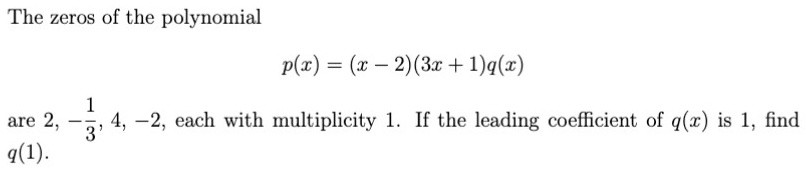
Keys come from the May 2026 papers and unlock only after you commit. Misses are the curriculum: revise the linked notes the same day.
Mock mode · exam-sim, key after submit
Sit a full paper in one go
Duration · planning estimate (papers print marks, not minutes)
No keys, revise-links, or hints during the run — they unlock after you submit. SA answers are self-marked at the end. Quitting discards the run.